
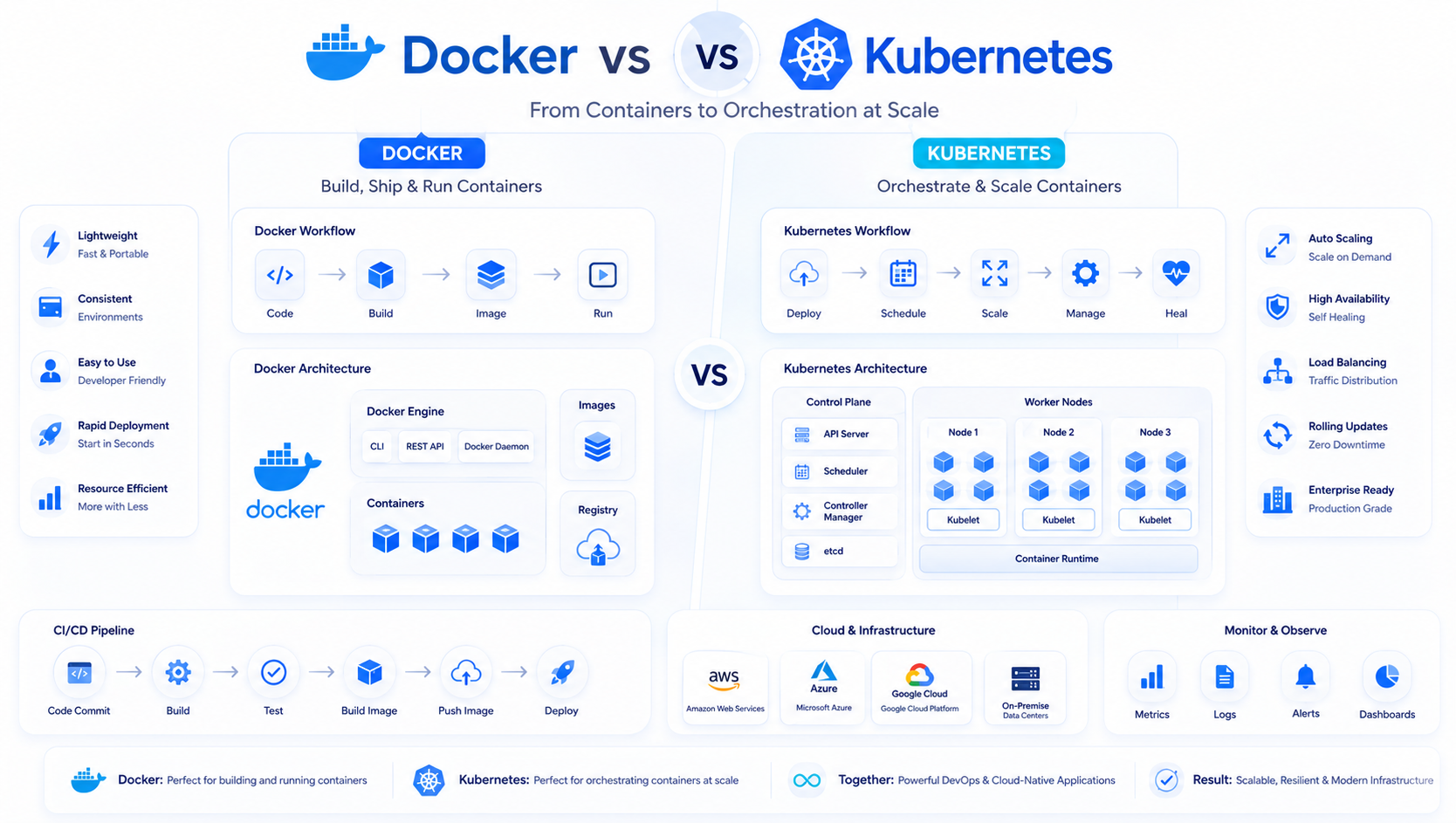
Introduction
Modern software development has evolved far beyond simply writing code. Today's applications must be reliable, scalable, portable, and capable of running consistently across development, testing, staging, and production environments. As businesses increasingly adopt cloud-native architectures and microservices, managing application deployment has become just as important as developing the application itself.
For many years, developers struggled with the common problem of "it works on my machine." Applications behaved differently depending on the operating system, installed dependencies, software versions, or server configurations. These inconsistencies often resulted in deployment failures, lengthy debugging sessions, and slower release cycles.
Containerization solved this challenge by allowing developers to package applications together with all their required libraries, dependencies, runtime environments, and configuration files into lightweight, portable containers. Containers ensure that applications run consistently regardless of where they are deployed, whether on a developer's laptop, an on-premise server, or a public cloud platform.
Docker revolutionized containerization by making it simple for developers to build, package, and distribute applications. Shortly after, Kubernetes emerged as the industry standard for orchestrating and managing containers at scale. While Docker focuses on creating and running containers, Kubernetes automates deployment, scaling, networking, monitoring, and recovery across clusters of servers.
Although Docker and Kubernetes are frequently mentioned together, they solve different problems and complement one another rather than compete directly. Understanding when to use Docker, when Kubernetes becomes necessary, and how they work together is essential for building reliable, scalable, and cloud-native applications.
In this guide, we'll explore Docker and Kubernetes from a practical developer's perspective, compare their architectures, explain their strengths and limitations, and help you determine which technology is the right choice for your next project in 2026.
Why Modern Applications Need Containers
Modern applications have become increasingly complex.
A single application may include:
• Frontend application
• Backend APIs
• Authentication services
• Databases
• Redis cache
• Queue workers
• File storage
• AI services
• Background schedulers
• Monitoring tools
Each component has its own dependencies and runtime requirements.
Managing these environments manually quickly becomes difficult.
Containers package everything an application needs into a self-contained unit that behaves consistently across every environment.
This eliminates compatibility issues while simplifying deployment and maintenance.
What Is Docker?
Docker is an open-source platform that enables developers to build, package, distribute, and run applications inside lightweight containers.
Unlike traditional virtual machines, Docker containers share the host operating system kernel while isolating application processes.
This makes containers:
• Faster to start
• More lightweight
• Easier to deploy
• Highly portable
• Resource efficient
A Docker container includes:
• Application source code
• Runtime environment
• Required libraries
• System dependencies
• Configuration files
• Environment variables
Everything needed to run the application travels together.
This guarantees consistency across development and production environments.
How Docker Works
Docker relies on several core components.
Docker Engine
The runtime responsible for creating and managing containers.
Docker Images
Read-only templates containing the application and its dependencies.
Docker Containers
Running instances of Docker images.
Docker Registry
A repository used to store and distribute images.
Popular registries include:
• Docker Hub
• GitHub Container Registry
• Amazon ECR
• Google Artifact Registry
Developers create Docker images once and deploy them consistently everywhere.
Benefits of Docker
Docker has transformed application development by simplifying deployment workflows.
Key advantages include:
Consistent Environments
Applications behave identically across machines.
Rapid Deployment
Containers start within seconds.
Improved Collaboration
Entire teams work with identical environments.
Efficient Resource Usage
Containers consume significantly fewer resources than virtual machines.
Simplified Scaling
Applications can quickly launch additional containers when needed.
Easy Rollbacks
Previous versions can be restored using earlier images.
These advantages have made Docker the default containerization platform for modern software development.
What Is Kubernetes?
Kubernetes is an open-source container orchestration platform originally developed by Google.
Its primary purpose is to automate the deployment, management, scaling, networking, and monitoring of containerized applications.
Running a few Docker containers manually is relatively simple.
Managing hundreds or thousands of containers across multiple servers is not.
Kubernetes solves this problem by providing centralized orchestration.
It continuously monitors applications and automatically performs tasks such as:
• Scaling containers
• Restarting failed services
• Distributing traffic
• Managing networking
• Rolling updates
• Self-healing
• Resource allocation
This automation allows organizations to operate large production environments efficiently.
Docker vs Kubernetes
Many developers assume Docker and Kubernetes compete with each other.
In reality, they solve different problems.
Docker focuses on:
Building containers.
Running containers.
Packaging applications.
Sharing application images.
Kubernetes focuses on:
Deploying containers.
Managing clusters.
Scaling workloads.
Recovering failed services.
Automating operations.
In most production environments, Docker and Kubernetes work together.
Docker builds the containers.
Kubernetes manages them.
Understanding Containers
Containers isolate applications from the host system.
Each container includes:
Application
↓
Dependencies
↓
Libraries
↓
Runtime
↓
Configuration
↓
Operating System Kernel
Unlike virtual machines, containers do not require a separate operating system for every application.
This makes them dramatically more lightweight.
Dozens or even hundreds of containers can run on a single server.
Containers vs Virtual Machines
Before containers became popular, organizations relied heavily on virtual machines.
Virtual Machines
Each VM contains:
• Full operating system
• Application
• Runtime
• Libraries
Advantages
• Strong isolation
• Independent operating systems
Disadvantages
• Large storage requirements
• Slow startup times
• High memory usage
Containers
Containers share the host operating system.
Advantages
• Lightweight
• Fast startup
• Lower resource consumption
• Easier deployment
Disadvantages
• Shared kernel
• Requires orchestration at scale
For most cloud-native applications, containers have become the preferred deployment model.
When Docker Is Enough
Docker alone works well for many projects.
Examples include:
• Personal projects
• Startup MVPs
• Development environments
• Internal business tools
• Small APIs
• Testing environments
• CI/CD pipelines
If your application runs on one or two servers, Kubernetes may introduce unnecessary complexity.
Docker provides a simpler deployment workflow while still delivering excellent portability.
When Kubernetes Becomes Necessary
As applications grow, managing containers manually becomes increasingly difficult.
Kubernetes becomes valuable when applications require:
• High availability
• Automatic scaling
• Load balancing
• Rolling deployments
• Multi-server infrastructure
• Self-healing
• Resource scheduling
• Centralized management
These capabilities make Kubernetes the preferred choice for enterprise systems, SaaS platforms, fintech applications, healthcare systems, and other production workloads that demand reliability and scalability.